Personal Dashboard / My Recycle Bin
Deleted documents are placed in a special location in MAGIQ Documents called the Recycle Bin.
Every MAGIQ Documents user has their own recycle bin. Documents and Folders that you delete are placed in your Recycle Bin.
MAGIQ Documents users can only see the contents of their own recycle bin however, the system administrator can search through every recycle bin to recover documents.
If another user deletes one of your documents or folders, it will be placed into their Recycle Bin and only the user who deleted the document or Folder or the System Administrator can recover this document.
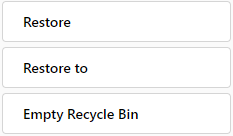
Depending on the choice of the System Administrator, you may be able to empty your Recycle Bin. If this option is turned on, you will see a button labeled "Empty Recycle Bin".
You should periodically empty your Recycle bin by clicking Empty Recycle Bin menu.
Note
Documents will be transferred to the system Recycle bin. Your System Administrator will have access to recover these documents for a specified period, if required.
To recover/restore a deleted document
- Open your Personal Dashboard
- Click My Recycle Bin
- This will launch the Recycle Bin window that will display all the documents and folders you have deleted.
-
Select the document you wish to recover
-
Click Restore to restore to its original location
OR
-
Click Restore to, if you want to recover the document to a different folder. You will be prompted for a destination folder. Select a folder and confirm your action.
The document will be restored to the state it was in prior to deletion, including its versions.
Note
If you "empty" your Recycle Bin, your documents will still be recoverable because they will be moved into the system recycle bin.
The system recycle bin can only be accessed by the system administrator or members of the administrators system user group.
Deleted documents can be restored without losing any information including meta data, security, versions etc. as long as they are not purged. Once purged, the system administrator can go back to tape backups and restore the document but all meta information will be lost.