Document Properties / Viewing Workflows
When authors submit their document for review, MAGIQ Documents creates a "Task" for each of the users defined in the first step of the workflow.
These users are notified with a "Task Notification" e-mail.
An entry into the user's task list is made so users can track their tasks from their "My Tasks" window.
Task Assignees may view a complete list of their tasks by clicking Modules menu > My Tasks.
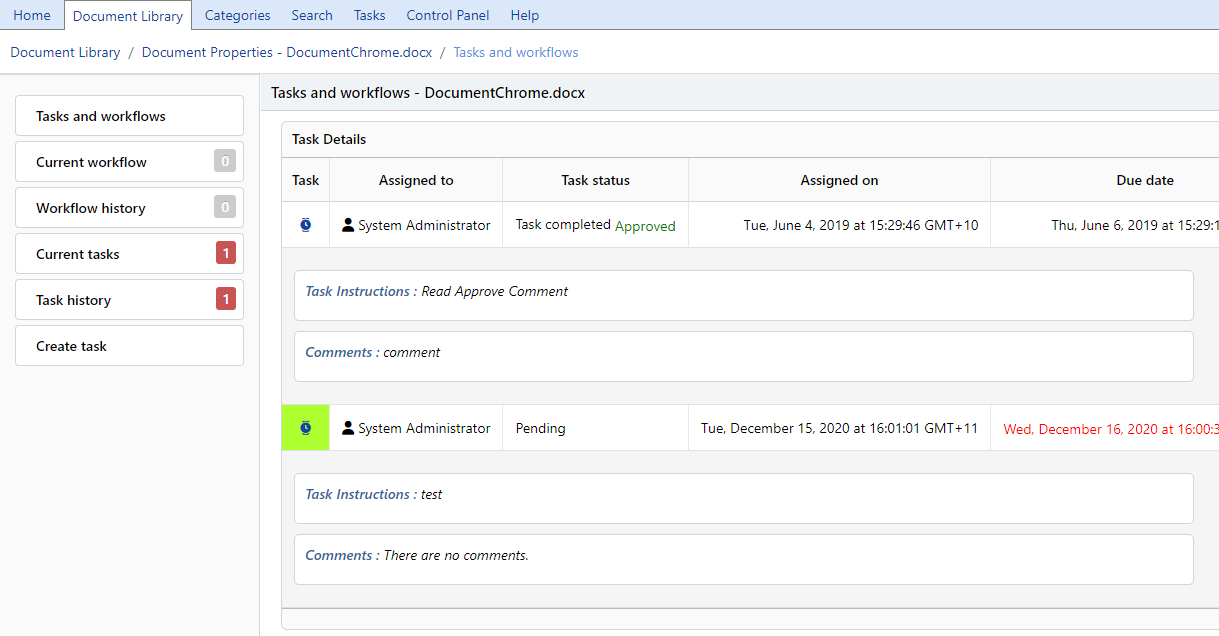
Tasks and Workflows
Displays all active workflows and tasks.
Current Workflow
Information displays if the document is currently in a workflow.
Workflow History
Displays completed workflows or workflows that have been previously assigned to the document.
Current Tasks
Information displays if the document is currently in a task.
Task History
Displays completed tasks or tasks that have been previously assigned to the document.
To open an active task
- Choose either Current workflow or Current Tasks
-
Click
 to open the active task.
 NOTE: you can only open an active task that has been assigned to you