Modules
The Modules menu provides access to additional MAGIQ modules and features. Please check with your system administrator if integrations are available.
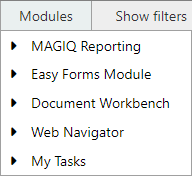
This menu caters for modules to be opened seperately.
MAGIQ Reporting
Produce standard or customised reports.
For more on this topic refer to the Reports guide.
Easyforms
Note
Only applicable if the EasyForms module has been purchased.
For more on this topic refer to the EasyForms guide.
Document Navigator
Runs the Document Navigator module without any documents loaded.
For more on this topic refer to the Document Navigator guide.
Document Workbench
Used for the registration of documents, including Emails.
Provides the ability to drag and drop items for registration, browse or search for a target folder, send to Workflow and apply Custom Property Set information if required.
The Document Workbench also can retain previous registration details for subsequent documents and the ability to search for document or folder associations.
For more on this topic refer to the Document Workbench guide.
My Tasks
If your Organisation is running Windows Server 2008, MAGIQ Document's In-tray module can be used instead of 'My Tasks'. The My Tasks menu option will display the original 'My Tasks' page, which caters for additional features such as 'Assigned to', 'Assigned By', etc
For more on this topic refer to My Tasks.