Word or Excel Connector / Panel Options / Open Local Checked-Out Document
Lists checked out documents from the Office Connector.
Note
Documents that have not originated from the Office Connector are excluded from the list.
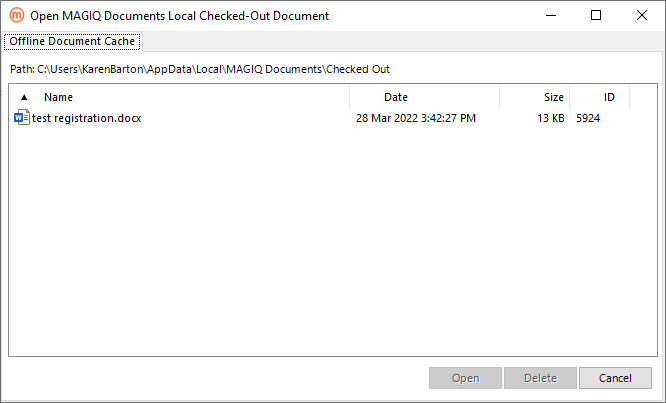
Path - displays a path to the MAGIQ Documents cache folder.
 Opens the document.
- Connected to MAGIQ Documents - the fields in the Version Save tab are enabled with the Next Version Number field incremented by one.
- No connection to MAGIQ Documents - the fields in the Version Save tab are disabled (including the Save to eDRMS button).
 Delete the document.
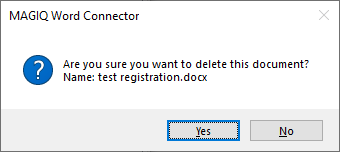
Displays the message of:
-
Yes deletes the document from the ‘Local Checked-Out Document’ folder as well as deleting the document id sub folder.
Connected to MAGIQ Documents - the document is checked-in without uploading a new version.
No connection to MAGIQ Documents - deletes the document from the "Local Checked-Out Document" folder.
-
No returns to the Open MAGIQ Documents Local Checked-Out Document window.
With connectivity to MAGIQ Documents the “Mouse over hover" tooltip on a row displays:
- Document Name.
- Document Date in ‘Local Checked-Out Document’ folder.
- Document ID.
- Latest eDRMS Version Number: (real-time from eDRMS).
- Latest eDRMS Modification: (real-time from eDRMS - "ModificationDate").
- Checked Out To: (real-time from eDRMS - "CheckoutBy").
- Checked Out Date: (real-time from eDRMS - "CheckoutDate").
With no connectivity to MAGIQ Documents the "Mouse over hover" tooltip on a row displays:
- Document Name.
- Document Date in ‘Local Checked-Out Document’ folder.
- Document ID.