Workbench / Features
Registering email attachments only
- From Outlook
- Drag and drop the attachment onto Add Files
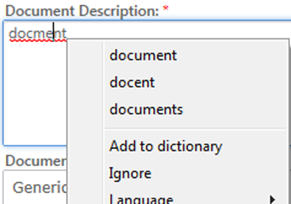
Spell Checking
If text appears with a red underline, right mouse click and choose correct spelling
Registration Queue
Viewing Documents
- Click
Or
- Click the arrow buttons to load a different document into the viewing pane

Deleting a Document
- Click
The selected Documents List will appear
- Click delete

Move to next document
Click the arrow buttons
How Do I Add Extra Documents to the Registration Queue?
- Click Add Files

- Choose My Computer
- Navigate to where your documents are located
- Highlight documents
- Click Open
Or
- Drag and drop emails or document onto
Keyboard Commands
Selecting tick boxes
Press the spacebar
Selecting entries within lookups
With the results visible, press tab for the results to become active, then use arrow keys to select relevant entry.