Office Connector / Metadata Tab
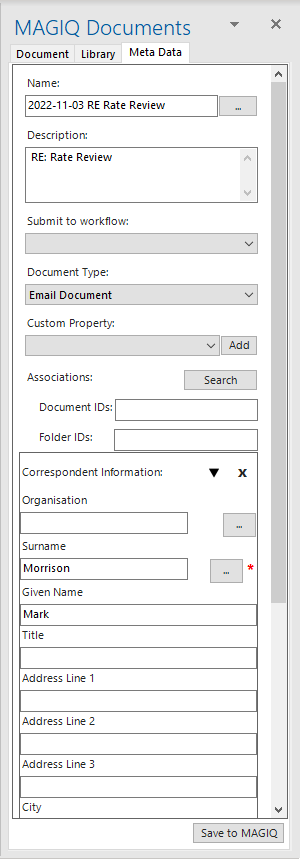
Name - The name is generated from the application preferences if document hasn’t been previously saved. Otherwise, the existing document name is used. Information can be changed for this email or document.
 Lists documents in the target folder path. Assists with naming conventions for new documents.
User selects an existing document name which replaces the Document Name value (without changing the extension) but appending a number to make it unique.
For example, if the original value in the Document Name field is "My Letter.docx" and then click on "ACME Contract.docx" and click OK, then the Document Name field is changed to "ACME Contract-1.docx".
Description - Determined by your application preferences. Information can be changed for this email or document.
Submit to Workflow - (Optional). Select a workflow if the document is required to go to someone else in the Organisation.
Note: any workflows that do not have a user assigned in the first task of the workflow should display with an asterisk (*) and prompt for a user to assign to.
Document Type - Determined by your application preferences. Information can be changed for this email or document.
Custom Property - Allows the addition of further custom properties, for example Document Additional MetaData.
 Custom Property Sets can be added on an Ad-Hoc Basis. Select custom Property Set from the combo and click the Add button.
Associations  for the relevant document or folder that you wish to associate. Use a comma to separate ids if you need
to add multiple documents or folders.
for the relevant document or folder that you wish to associate. Use a comma to separate ids if you need
to add multiple documents or folders.
Document IDs: if known, manually enter the document id.
Folder IDs if known, manually enter the folder id.
Everything under Associations are custom property sets that have been determined by either the Foundation Settings or the default custom property set specified against the document type.
In the example above, Correspondent Information is the default custom property set for the document type of Email Document.
The information prepopulated is determined by you application preferences. Information can be changed for this email or document.
 only applicable for Word or Excel Connector. Opens the Version Save tab.
 Registers/Saves the email or attachment into MAGIQ Documents.