Folders / Compacting Folders
MAGIQ Documents retains multiple versions of documents. Over time, you may end up with too many revisions of documents. The compact function allows you to get rid of previous versions of documents within a folder or library.
This feature should be used with caution. Deleted versions cannot be restored.
To Compact your folder
Note
The compact function is permanent and cannot be reversed. You will not be able to restore (through the recycle bin) previous versions removed through compacting.
Be mindful of retention and disposal regulations as to whether versions can or cannot be deleted.
- Click on the Action menu for the folder you wish to compact
- Choose Properties from the menu that appears.
- Select Compact Versions from the side menu.
- The "Compact" window will appear.
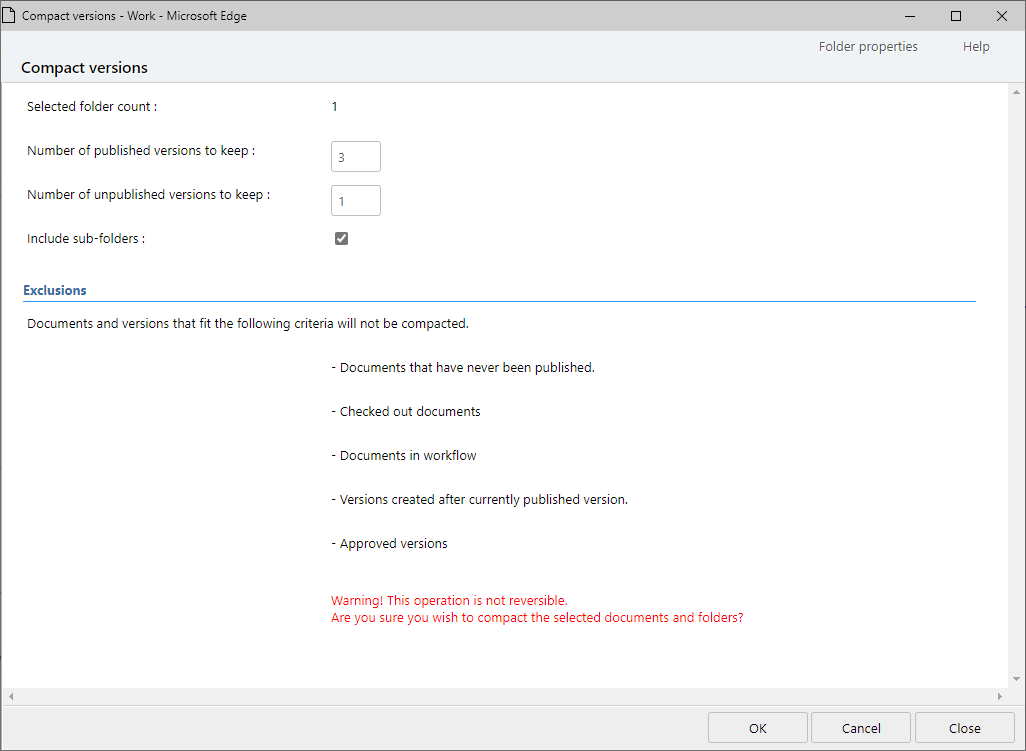
- Specify the number of published versions you wish to retain. {n}
- Specify the number of unpublished versions you wish to retain. {n}
- Select "Include Subfolders" if you want this operation to apply to subfolders as well.
- Click OK.
MAGIQ Documents will examine each document in the path and only keep the latest {n} versions and delete the rest.
When the "Compact" operation is complete, each document in the folder (and subfolders if selected) will have been processed according to your selections. However, there are many exclusions.
Exclusions
- Documents that have never been published
- Unpublished versions created after the currently published version
- Approved versions
- Checked out documents
- Documents in workflow
Example
A document has 6 versions. (6,5,4,3,2,1)
You "Compact" the folder and specify 2 versions as the number of versions you wish to retain.
After the "Compact" operation is complete, the latest 2 versions will be kept and the rest will be deleted.
Version 6
Version 5
Version 4 (Deleted)
Version 3 (Deleted)
Version 2 (Deleted)
Version 1 (Deleted)
It is a good idea to compact your folders every now and then to reclaim some disk space, providing your retention and disposal allows it. Completed projects and submitted proposals are good candidates for the "Compact" feature.