Connector / Version Tab
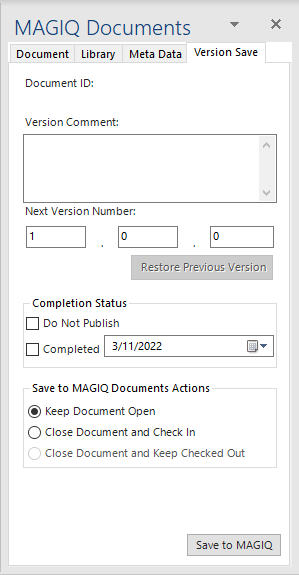
Document ID - Document ID and Version number display if the document has been opened via the document action of Open document from MAGIQ, or from the Save to MAGIQ Documents actions of Keep Document Open.
Version Comment - free text version comment that can be entered for the document version.
Next Version Number - Displays the next version number of the document when saved. This can be modified.
If changing the version number it cannot be <= than the current version displayed. Manually entering a number <= the current version will be ignored and incremented by 1.
Restore Previous Version Only applicable for the word and excel connector. An earlier version of the document can be restored as the current version. Disabled until multiple versions are available.
Completion Status
-
Do Not Publish - flag to denote the document version is to be saved as an unpublished document.
-
Completed - flag to denote the document is completed/work is no longer required.
Completed Date - Disabled until the Completed box is ticked. Date defaults to current date with a calendar control to select an alternative date, if required.
Save to MAGIQ Documents Actions
-
Keep Document Open - uploads the document to MAGIQ Documents and leaves the document open in the ’Local Checked-Out Document’ folder for continued editing.
-
Close Document and Check In - uploads, closes and checks-in the document to MAGIQ Documents. Document is deleted from the ‘Local Checked-Out Document’ folder.
-
Close Document and Keep Checked-Out - uploads, closes and checks-out the document to the ‘Local Checked-Out Document’ folder.
Note: if the document did not originate from the ‘Local Checked-Out Document’ folder then this radio button is disabled.
 works in conjunction with Office Save to MAGIQ Documents Options.
When the document is saved successfully with Keep Document Open the Library and Meta Data tabs can no longer be modified.
Restore Previous Version
Restore an earlier version of the active document/spreadsheet from MAGIQ Documents.
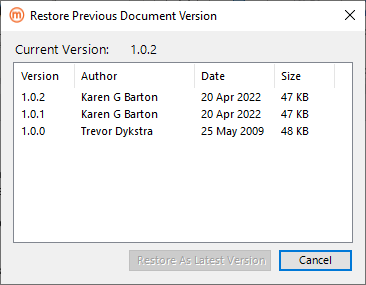
All previous document versions for the active document display in descending order (latest version at top). Hovering on a version displays a tooltip with the Version Number and the Version Comment.
 Enabled once a version is selected.
Closes the current version and opens the selected version. Displays the Version Save tab with the Next Version Number incremented by one.
User needs to select to complete restoration as a new version.
Enabled once a version is selected.
Closes the current version and opens the selected version. Displays the Version Save tab with the Next Version Number incremented by one.
User needs to select to complete restoration as a new version.