The Tools Menu
Options in this menu require the documents or folders to be selected first by ticking the box the left of the document name.
Most options on this menu may be applied to multiple documents and or folders.
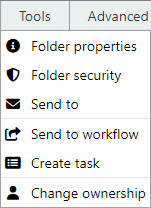
Folder Properties
Launches the folder properties window.
Folder Security
Launches the security options for this folder.
Only authorized users can see or edit the folder security definitions screen.
Send To
Send the selected document(s) to another person via email regardless of whether they are an MAGIQ Documents member or not.
For more on this topic refer to distributing documents
Send to Workflow
Can be applied to multiple selected documents.
Displays a list of Workflows that apply to the document library and folder you are currently looking at.
You can choose from one of the items in the list and submit your document to the selected workflow.
The document will then be directed to users nominated as part of the workflow.
System administrators can create additional workflows.
Create Task
Can be applied to multiple selected documents.
Using this menu, users may assign other users tasks based on the selected documents.
For more on this topic refer to create Task.
Change Ownership
Launches the change ownership window.
End users are not required to use this function.
Ownerships of folders can be changed; However, Library Policies determine who can use this function.