Publishing Portal / Administration / Manage Organisations (facilities)
An Organisation (facility) is the second tier in the management chain (equivalent to a Department).
As an organisation administrator you can maintain or manage users assigned to the organisation.
Creating Organisations
- Click

- Enter a Name and Description.
- Click Ok.
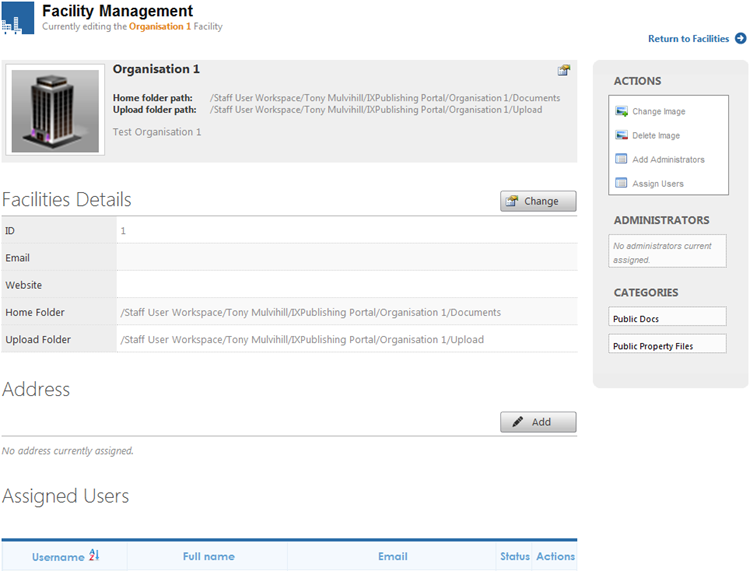
Selecting the organisation (facility) name will display the following information.
Changing Facility Name and Description
- Click
 for the right of the Facility Name.
 - Enter the new details and click
 .
.
Allocating Folder Paths
- Click
 to the right of Facilities Details.
 - Next to Folder Path, navigate your way through the MAGIQ Documents library structure.
- Upload Folder – Nominate a folder where documents can be uploaded to. Your Records Manager, for exmaple, can then move the documents into the relevant folders.
Facilities Details
Displays the Email, Website address entered on creation.
Clicking will allow you to change those details and to add a home folder and upload folder destination.
Address
Displays the address information for the organisation.
Click  to add details.
Assigned users
Displays which users are associated to the organisation.
To Assign Users
- Click Assign users in the Actions menu.
- Tick the box bext to the user name.
- Click Ok.
Actions
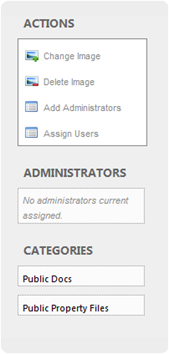
-
Change Image - Changes the image / photo of the organisation.
-
Delete Image - Removes the image / photo from the organisation.
-
Add Administrators - Specify who can administor this organisation.
Once Administors and Categories have been applied, their names will display below the actions menu
-
Assign Users – Specify which users are able to access the organisations documents.
Administrators
Lists which users can administer the organisation.
Categories
Lists which category the organisation belongs to.
Deleting Organisations
There are two ways an organisation can be deleted:
-
Tick the box next to the organisation name that you wish to delete and click Click

Or
-
Click
 (Delete) next to the organisation (facility) name.