Security / Document Security
MAGIQ Documents allows the assignment of various levels of permissions to documents. The levels of document permissions available are as follows:
- No Access
- Read
- Change
- Full control
New documents automatically inherit the permissions defined at its folder. Authors (the owner of the document), may alter these default (inherited) permission settings. Permissions may be granted to "Users", "User Groups" and the "Everyone" group.
When authors change the permission settings for a document, they may only grant permissions to users who are members to the Library in which the document lives.
To assign permissions to a document
- Select the document you wish to assign permissions by clicking Action drop down > security.
- A window showing the currently assigned security permissions will appear.
- Click change permissions.
- In the "Document Security" window, select users from the list on the left.
- Make sure that you also select the appropriate access type from the drop down list box. The default is "Full Control".
- Click Add.
- The selected users will be added to the security list with the permission level selected.
The permissions matrix
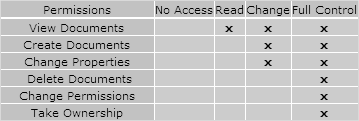
Notice that the access rights are cumulative. Each access level contains the rights of the one before it, and provides additional rights.
No Access is the same as not including a user in the access list. It is used in instances where a permission is given to a user group or the "Everyone" group and you wish to exclude a member of the group from the assigned security.
For more information on groups, refer to User Groups.
Example
User A has "Full Control" rights in a folder. User A has been given "No Access" permissions to a document in that folder.
When User A attempts to access the document, he/she will get the "Access Denied" message. However, because User A has "Full Control" rights at the folder level, he/she will be able to modify permissions on any document in that folder, even take ownership of any document in that folder.