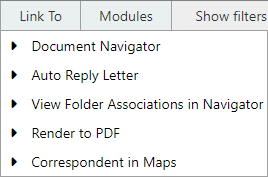
Link To
Provides access to additional MAGIQ modules and features.
Please check with your system administrator if integrations are available.
Tip
Requires a document to be selected first before opening the module
Document Navigator
Document Navigator allows viewing of selected documents.
To view individual or multiple documents :
- From either the document library, search result screen or My Favourites list
- Select documents by checking the box to left of the document name or, to select all documents, check the top box.
- Choose Link To > Document Navigator
Alternatively, for a single document to be viewed, choose Document Navigator from the action menu
For more on this topic refer to the Document Navigator guide.
Edit in EasyForms
Note
Only applicable if the EasyForms module has been purchased.
Allows for documents created by easyforms to be edited.
For more on this topic refer to the EasyForms guide.
Auto Reply Letter
Used for generating response letters for existing documents.
This is achieved by gathering relevant metadata from the document properties and placing the information into defined bookmarks within a Word document.
For more on this topic refer to the Auto Reply Generator guide.
View Folder Associations in Navigator
Displays all documents that are associated to a folder.
To view folder to document associations:
- Navigate to the parent level of the folder
- Tick the box next to the folder name
- Select View > View Folder Associations in Navigator
Note
Only documents will load in the navigator
Display Correspondent in Google Maps
A correspondent's address will display in Google maps, providing the Correspondent Information custom property is applied to the document.
Render to PDF
Documents can be created as PDFs and saved back into MAGIQ Documents as a new document or version.
For more on this topic refer to the Render to PDF guide.