Folder Security
MAGIQ Documents allows you to assign folder level permissions. To assign folder level permissions, you must have "Full Control" rights to the folder.
Folders automatically inherit security permissions from the parent folder. In order to make a change, the Library Policy must allow you to modify folder level security permissions and is usually restricted to the System Administrator and Library Managers.
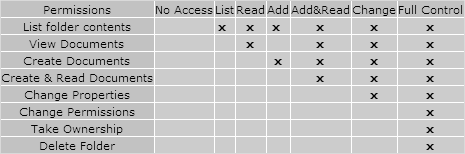
The permissions below can be added to a folder.
- No Access
- List
- Read
- Add
- Add and read
- Change
- Full Control
When you assign permissions to a folder, those same permissions will be automatically inherited by any documents or folders contained in the folder. You may assign permissions to "Users", "User Groups" and the "Everyone" group.
To assign permissions to a folder
- Navigate to the folder. Click Action drop down menu > Security.
- Alternatively, Click Action drop down menu > Properties > Security
- In the "Folder Security" window, select users from the first list.
- Make sure that you also select the appropriate access type from the drop down list box.
- Click Add
-
The selected users will be added to the security list with the permission level selected.
No Access is used in instances where access is given to a user group and you wish to prevent a user within that group from accessing the document or folder. By giving them the No Access permission, their access will be revoked even though they belong to a group which has access
Note
BEWARE Add & Read permission will not allow Users to add Meta Data, send the document to Workflow, add document comments etc.
Permissions given to individuals supersede the permissions given to user groups.
Example:
- User Group A has been given "READ" permissions to a folder
- User A is in User Group A
- User A has been given "Full Control" permissions to the folder.
- User A will have "Full Control" permissions to the folder NOT "READ"
For more information on groups, refer to User Groups.
Permission Inheritance:
Setting this option while assigning folder permissions allows you to specify that a folder should inherit its permission list from its parent folder. This is optional, but recommended, because it dramatically reduces the time needed to apply security to child folders.
For more information on this topic, refer to Inheritance.
Note
Groups or users granted "Full Control" at the parent folder level can delete or change any sub-folders, regardless of the permissions protecting the folder. Any user with "Full Control" rights can set or alter the security at any of the subfolders.