The Menu System / View Menu
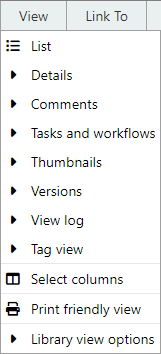
MAGIQ Documents allows you to view folder or document information in various ways.
To change your view type, click the View Menu and select a view type.
Notice, the current view type will be marked with  to the left to indicate that this view type is active.
Each view type displays different types of information about documents in the folder.
List
Displays a simple document listing. No additional information is displayed.
Details
Displays additional details about the folder such as folder description and links to associated items.
Utilisng this view type for documents displays the document description, any associated documents and comments (if they exist).
Comments
Displays all the comments added to each document.
Tasks and Workflows
Displays current workflow or task information relating to the document. Information displayed includes the task status, start, due or completion dates.
Thumbnails
Displays a small image, allowing you to identify the image visually. Used for folders containing images. The image must exist in MAGIQ Documents for it to be recognised.
Versions
Displays a list of all available versions of a document. You can view previous versions of any document by clicking on the version number.
View Log
Displays a log of users who have viewed each document. Shows the date and latest version number viewed.
Tag View
Displays all tags applied to the documents in a given folder.
For more on this topic refer to tagging documents
Select Columns
Select from a complete list of fields that you wish to display in the document list. You can add to or remove from the selected columns and rearrange the order in which they are displayed by using the up and down buttons.
For more on this topic refer to Select Columns.
Print Friendly View
Displays a printer friendly view eliminating buttons and extra graphics for easy printing.
Library View Options
Options for showing hidden and archive libraries in the navigation tree.