Reporting / Cloud / Analytics / Fields
Fields (numeric, text or date) are used in the data browser or charts to display data. Fields can relate to columns within the database or can be calculated dynamically using any valid SQL.
Fields can be dragged and dropped onto the Data Browser or Chart widgets to define the required reports.
To add fields to the data browser widget
- Right click in the data browser widget.
- Select Fields – Add.
- Navigate to your chosen field.
- Drag and drop the field into the data browser widget.
OR
To add fields/columns from the navigation tree
- From the Navigation Tree.
- Select fields.
- Navigate to your chosen field.
- Click and drag the field into the data browser widget.
To add Multiple fields/columns from navigation tree
- Hold the Shift (selecting a group of layers) or Control keys (selecting several individual layers) to make your selection before dragging the columns onto the Data Browser window.
Overview of Fields
Note
The fields listed below refer to our standard data. If you have custom property sets or fields within existing custom property sets that need to be added, please contact your Account Manager.
Document Fields - Information relating to the document.
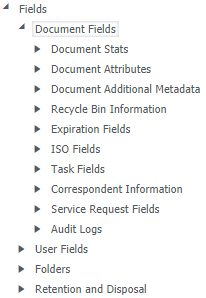
Document Stats - Statistics per month.
Document Attributes - Anything about the document, for example Document ID, Document Name, Document Description, Owner Name etc.
Document Additional Metadata - Fields within the custom property set called 'Document Additional Metadata'.
Recycle Bin Information - Deleted documents that exist in recycle bins.
Expiration Fields - Expiration date applied to a document.
ISO Fields - ISO/Periodic Review information such as who it was assigned by, to has reviewed it etc.
Task Fields - This is broken down into two sections:
- Task Attributes - Task and workflow information such as Task Assigned by, task due date, task finish date etc.
- Task Stats - Refers to task statistics per month.
Correspondent Information - Fields within the IX_CORRESPONDENT custom property set.
Service Request Fields - Fields within the IX_SERVICE_REQUEST custom property set.
Audit Logs - Fields that capture the auditing of documents such as Deleted Documents Date, Deleted By etc.
User Fields - Fields based on user properties.
User metadata relates to the custom property set called 'User Metadata' (IX_Users).
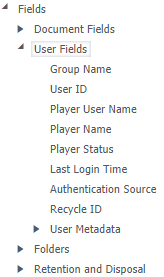
Group Name - The global or local user group the user belongs to.
User ID - Users ID number.
Player User Name - Username of the user.
Player Name - First Name and Surname of the user.
Player Status - Is the user enabled, disabled or read only.
Last Login Time - The Last time the user logged into MAGIQ Documents.
Authentication Source - How the user logs in:
- NATIVE – manually enter a username and password.
- MAGIQ - uses MAGIQ Cloud authentication.
Recycle ID - The users recycle bin ID.
User Metadata - Refers to fields within the custom property set called 'User Metadata' (IX_Users).
Folders - Fields based on folder properties.
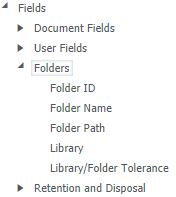
Folder ID - Folder ID number.
Folder Name - Name of the folder.
Folder Path - Path where folder is located.
Library - Library where folder resides.
Library / Folder Tolerance - This is a system field that we use to colour the folder structure, ie red for archive and green for active.
Retention and Disposal - Retention and disposal information entered on documents and folders as well as schedule information.
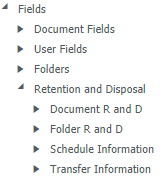
Document R and D - Fields relating to the document retention and disposal, such as Document Cut off date, document disposition date etc.
Folder R and D - Fields relating to the folder retention and disposal schedule, such as folder cut off date, folder disposition date etc.
Schedule Information - Fields relating to the schedules such as Schedule name, retention trigger etc.
Transfer Information - Date submitted for transfer, date approved for transfer and transfer location.