Users and User Management / Users
All users must have a valid account in MAGIQ Documents before they can access MAGIQ Documents (except Anonymous users). MAGIQ Documents user accounts are created by the System Administrator, members of the [Administrators] system global user group, members of the [User Managers] system global user group and Library Managers (local users) and are stored in MAGIQ Documents' own security database.
Your user account is what identifies you to both the system and to other users. Only users with valid MAGIQ Documents accounts can be granted permissions within the document and folder security framework.
Users with valid accounts (also called authenticated users) can perform tasks such as creating documents, editing existing documents and creating folders as defined by their security profiles.
There are four types of Users
- Regular Users.
- Anonymous Users.
- Read Only Users.
- Local Users.
Regular Users
- They are assigned a user id and password.
- They can be audited and tracked.
- They only see and operate in anonymous libraries and libraries to which they have been granted access.
- They access and operate in folders to which they have been granted access.
- Their activites are limited by document and folder security assigned to them.
- They can create, edit documents and folders based on the security that has been assigned to them.
Anonymous Users
Anonymous Users are NOT created. They exist inherently whenever Anonymous Libraries are created.
- They do not have user ids and passwords.
- They cannot be audited and tracked.
- They only see and operate in "anonymous libraries".
- They cannot see or access libraries that are not "anonymous".
- They cannot be assigned or granted security.
- They can read documents in "anonymous libraries"
Read Only Users
Read Only users are created by the System Administrator, members of the "User Managers" system user group and members of the "administrators" user group.
- They have assigned user ids and passwords just like regular users.
- They can be audited and tracked.
- They only see and operate in anonymous libraries and libraries to which they have been granted access.
- They can be assigned or granted security (the maximumsecurity level is "READ").
- They can read documents in "anonymous libraries".
- They cannot edit, delete, or modify settings for any existing document or folder
- They cannot create new documents or folders.
Local Users
Local users can be created by the System Administrator or Library Managers. These users are created locally inside individual libraries.
- They are assigned a user id and password.
- They can be audited and tracked.
- They only see and operate in anonymous libraries and the ONE library in which they have been created.
- They cannot cross over to other libraries.
- They access and operate in folders to which they have been granted access.
- Their activites are limited by document and folder security assigned to them.
- They can create, edit documents and folders based on the security that has been assigned to them.
Searching or filtering users
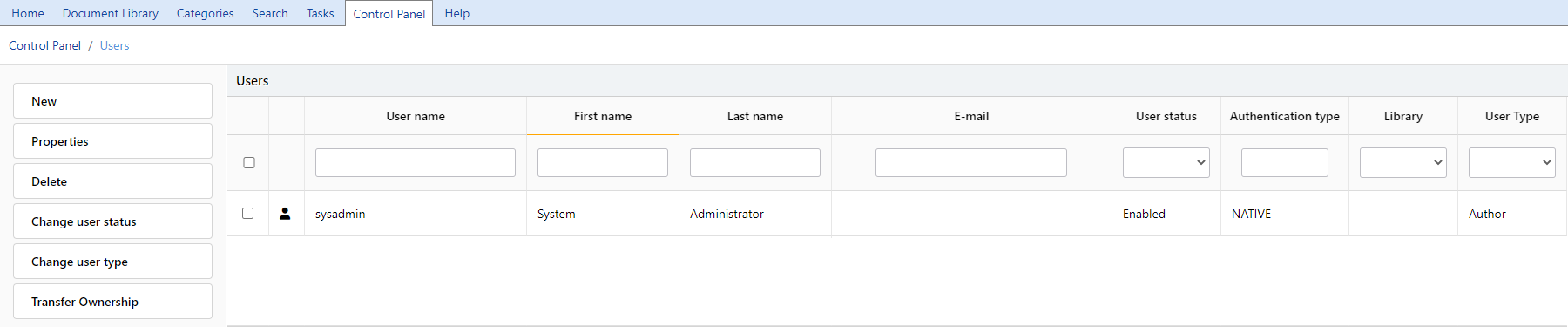
By entering a username, first name, last name, email address or authentication type and pressing enter. Or choosing an option from the user status or library drop downs, a list of users will display. The Library filter will display those users that are local members of the selected library.
The menu options include:
New
Refer to create users
Properties
Refer to user profile
Delete
Refer to delete users
Change User Status
Change the status (Enabled/Disabled) of a user either individually or in bulk.
Change User Type
Change the type of user to Author or read Only.
Author is our default user type. Read Only is for users that only need to read documents, for example auditors.