Reporting / Cloud
By default, paging is enabled, to stop large amounts of data being processed at once.
When creating reports, paging might need to be disabled.
- To disable paging:
- Right click in the data browser.
- Select Configure
- Scroll down to the 'Paging' section and untick 'Enabled'.
Sorting - Double clicking the column header sort information in ascending or descending order.
Create a report
It is always best to start with an existing report.
- From the navigation tree.
- Select Reports > Shared with Everyone.
- Double click on a report to open in the data browser (right hand side of screen).
- With the report open, you can add/Remove fields.
- You might like to change the layout of the report to either Multi-layer or cross tab.
- Click
 to save the report.
Multi Layer
A report that shows details to drill through, for example showing the total number of tasks that are Pending, Completed etc for users/particular user.
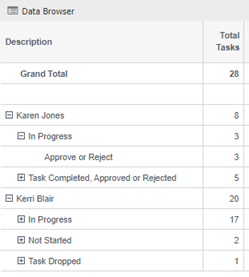
- In the data browser, right click and choose Layout > Set Multi Layer.
-
Select the layers of:
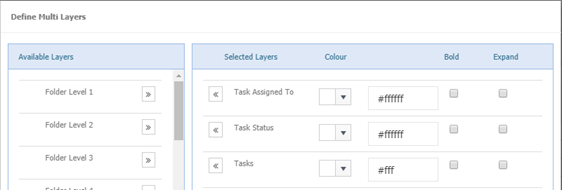
You will now be able to drill down through each user or person to whom the tasks have been assigned to
-
To only show relevant users, select the filter of 'Assigned To' from the 'Navigation Tree', select the relevant user/users.
-
To return results for a particular year, select the filter of 'Documents by Register Date', select which year/years you would like.
Cross Tab
Cross Tab
A report that shows how total documents registered by whom for the years of 2014 – 2019.
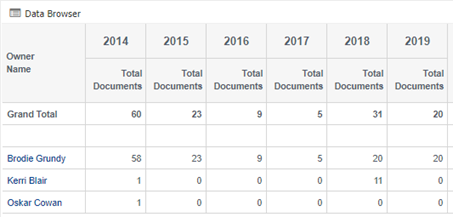
- In the Navigation Tree, select the filter of 'Documents by Register Date'. This will only show the data that you want.
- In the Data Browser, right click and choose layout – crosstab.
- Select 'Registered by Year'.
- This will show the total documents registered per year, for the years chosen in the filter.
- Using Zoom To, select the ‘Registered By’, this will now show the total number of documents registered by a user.
- If you wish to only show certain users, choose the filter of 'Registered By' from the 'Navigation Tree'.