Retention & Disposition / Schedule Information
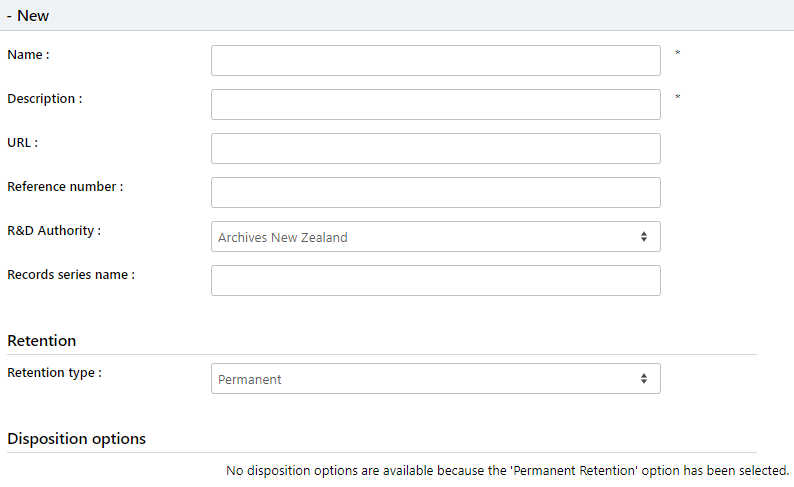
Name - Name of the schedule which will be displayed on documents and folders i.e. GA39 2.1.1 - 2YR – Community – Addresses – Non Significant.
Description - Description of the Schedule, i.e. Destroy 7 years after last action.
URL - Optional. Website links to state records schedules.
Reference Number - Reference number in schedule i.e. GA39 2.1.1
R & D Authority - Which source did it come from i.e. State Records of NSW.
Records series name - Optional. How are the records categorised. Ie Financial Records.
Retention:
Retention Type - Select either ‘Permanent’ or ‘Temporary’.
- Permanent, no disposition options are specified because these documents remain in the system.
- Temporary displays the Retain for and dispose after options:
Retention Trigger - Select either ‘Upon Creation’ or ‘Upon Cut-off’. Specify either year, month, or day for how long the record is to be retained for.
Disposition Options:
Dispostion Type - Choose either ‘Final disposition (destroy)’ or ‘Transfer to external agency’.
Dispostion Trigger - ‘Upon creation’, ‘Upon Cut-off’ or ‘Upon Retention End’.
Dispose after - Specify either year, month or day for how long the records is to be disposed after the relevant action.
Transfer Agency - Only displays if ‘Transfer to External agency’ is specified in Disposition Type drop down. Used to specify which agency.
Move to folder - Select which folder you wish to move the record to once the disposal period is reached. Typically, this folder would be held within an archive/destruction library. Changing this path will be reflected on all documents under this schedule.
Create task - Tick to send a task. Allows administrators to better control tasks when large volumes of documents need to be disposed
Send Email - Tick to send an email. Allows administrators to better control email traffic when large volumes of documents need to be disposed.