Getting Started / A Quick Guide
Home Page
The MAGIQ Documents homepage (portal) is a customisable interface that can be used as a shortcut or a one stop shop for accessing a large range of functions and items within MAGIQ Documents. For example, Access Favourite Folders and Documents, Outstanding Tasks or any Documents you may have Checked Out.
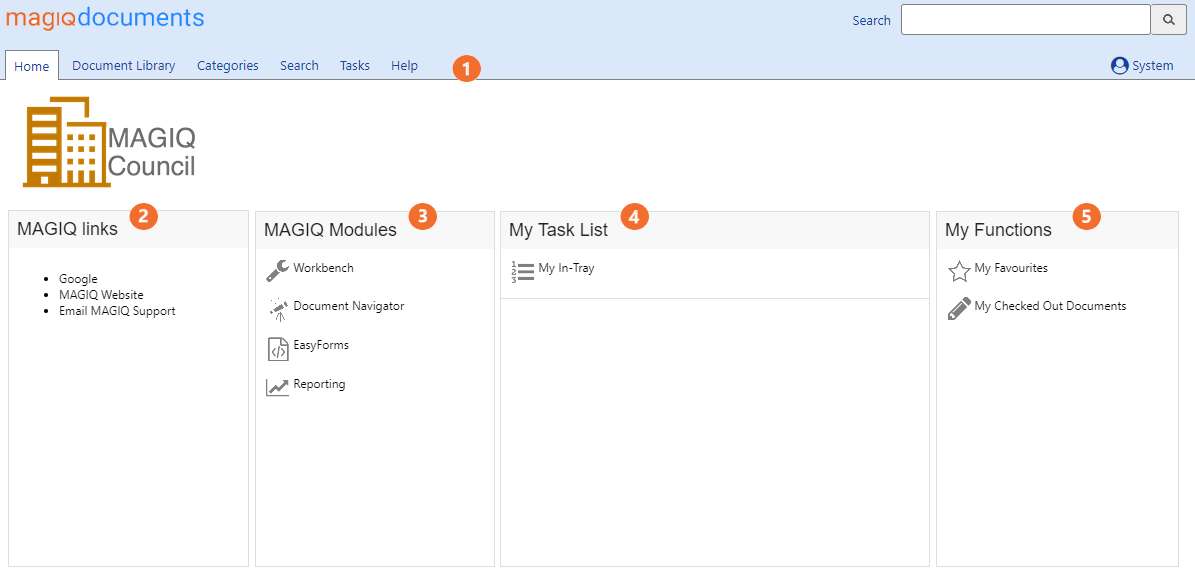
 Page Tabs
Once you have successfully logged on additional Tabs will appear at the top of the screen, these options are described in the section below.

Home
This fully customisable page offers a range of functions as explained in the following section.
Document Library
Browse for documents and folders, upload and edit documents and more.
Categories
Perform searches on customisable categories.
Search
Search for MAGIQ Documents items using this screen.
Tasks
Allows users to complete, reassign, change due dates and change finish dates of tasks. Also available in Personal Dashboard
Control Panel
Perform administrative functions (Generally only visible to Administrators - most of the options here are restricted to the Administrator).
Help
Access MAGIQ Documents help files.
Logged in user name
Known as the personal dashboard. Each logged on member can manage their accounts from here, access favourite documents, complete tasks etc.
 ,
, ,
, &
&  are portal gadgets that provide links to other areas in the system, for example:
MAGIQ Links - Click to quickly access listed websites
MAGIQ Modules - Quick access to MAGIQ Documents Modules such as Document Navigator, Document Workbench, or reporting
and Easy Forms (optional)
My Task List - Review outstanding tasks
My Functions - View your favourite documents or folders and checked out documents
For more information, refer to portals